Convert a docker container into an image using docker commit command
You will learn how to use docker commit command to convert a docker container into a docker image.
Docker run vs Docker commit
- Docker run command is used to create a container based on a docker image.
- Docker commit command is used to create a new image based on the file changes made inside the container.
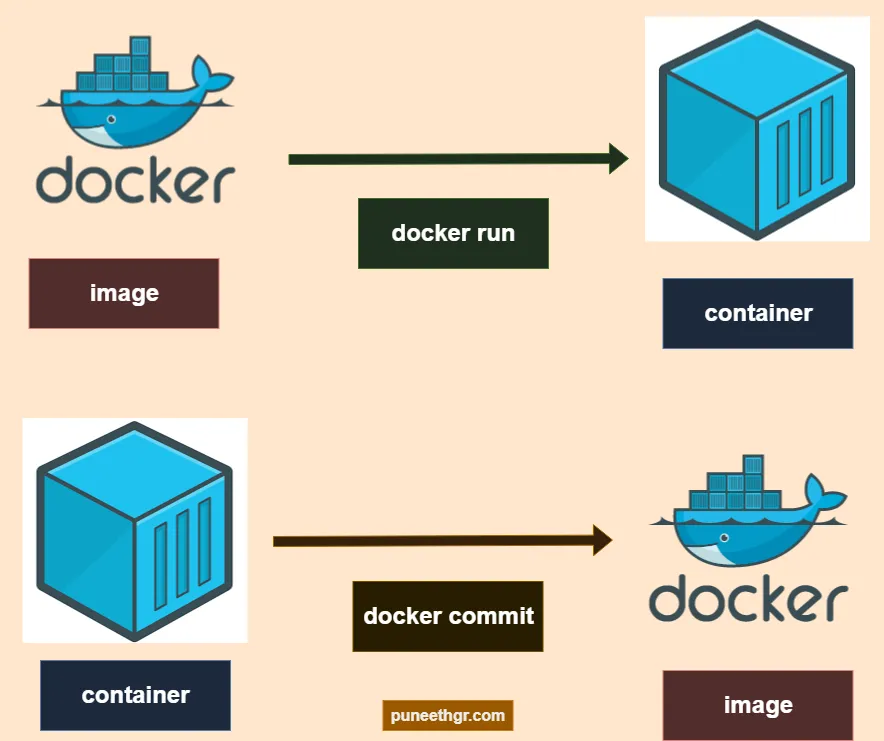 Diagram: Docker run vs Docker commit
Syntax:
1
docker commit [options] container-id-or-name [image-name]:[image-tag]
Example:
To convert a container ubuntu_container into an image ubuntu_image with the image tag as version3:
1
docker commit ubuntu_container ubuntu_image:version3
Any data present in the mounted volumes of the container are not committed in the new image.
Options available in Docker commit
The below table shows the options available within docker commit command:
| Options available | Description |
|---|---|
-a or --author |
Author name |
-c or --change |
Apply Dockerfile instruction to the new image Eg: CMD, ENTRYPOINT, ENV etc. |
-m or --message |
Add a custom message in the image |
--no-pause |
Don’t pause container/processes during the commit operation |
Pause option in Docker commit
The default behavior of docker commit uses a “pause” i.e. it makes the container and the processes within it be “paused” while it is being converted to an image. This pause is used to prevent data corruption during the commit operation. If you don’t want the pause operation, you can use the option docker commit --no-pause.
By default, docker commit uses the pause operation.
Previously, there used to be a option called
--pause trueor--pause false. But since Docker Engine Version 29, the--pauseflag has been deprecated in favor of the new--no-pause. Reference: pull request.
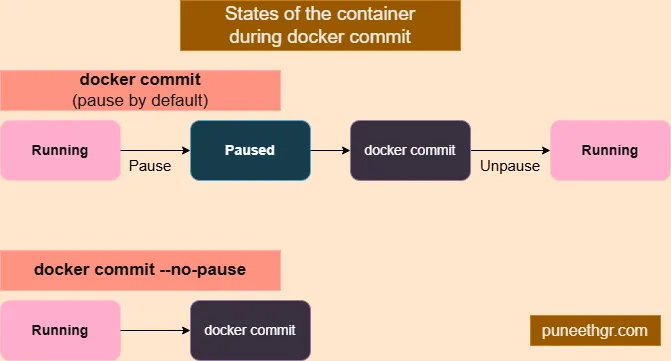 Pause option in docker commit command
Youtube tutorial - Docker commit: Convert a docker container into a new image
Note: At the time of recording of the Youtube tutorial, the old pause option was used (--pause true or --pause false). The new pause option is --no-pause.
References
Docker official documentation on docker commit and docker run
Thank you!